Getting started
What your chatbot does
When you add a chatbot, its second tab, What it does, asks you to choose one of four types. Your choice sets how it talks to your visitors. A new chatbot starts as Sales. You can change it at any time: open the chatbot, click Customise, then What it does, and click Save.
Each type shows a short sample conversation, so you can see the difference before you choose.
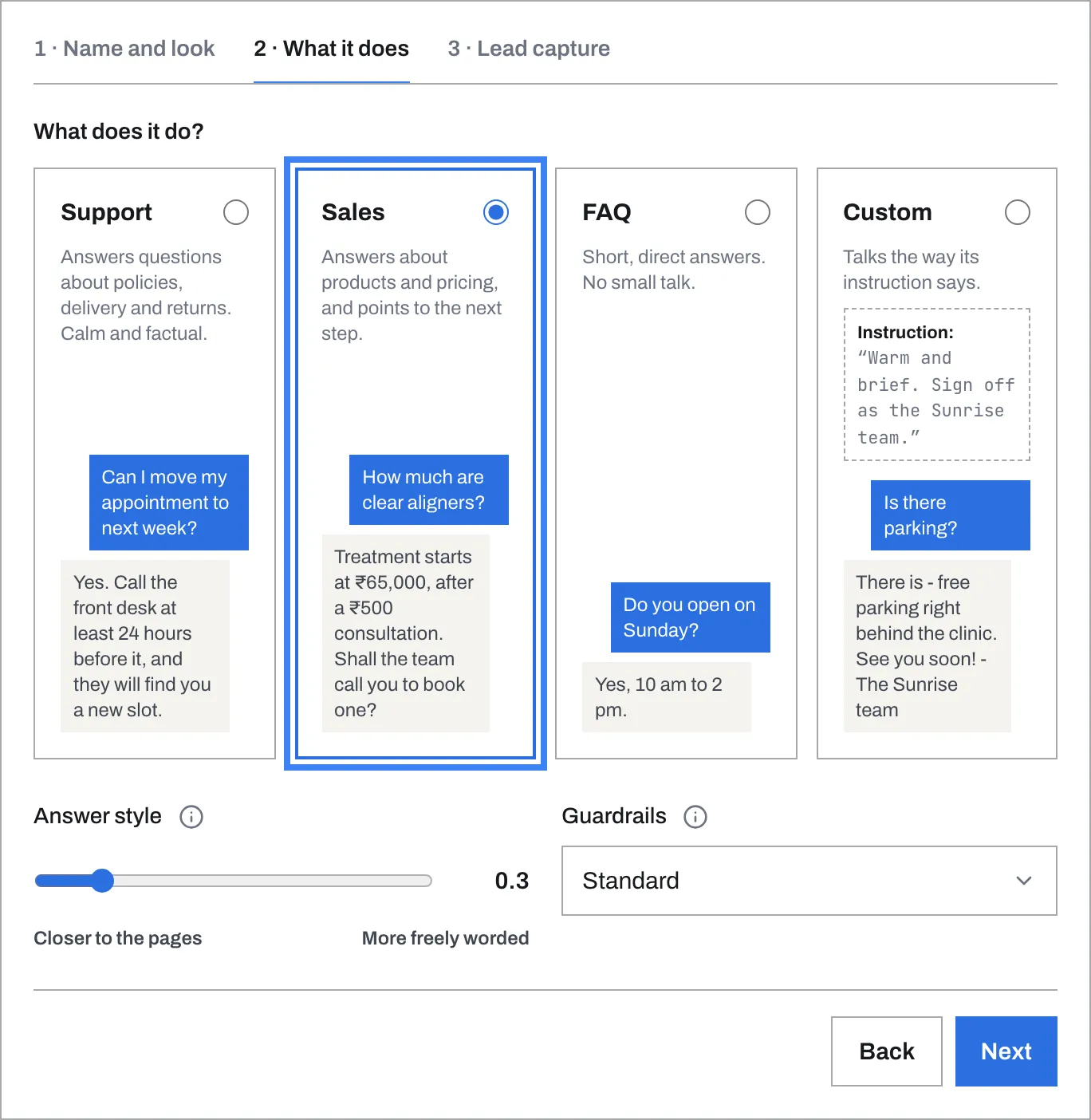
The four choices
Support - “Answers questions about policies, delivery and returns. Calm and factual.” It answers in a sentence or two and does not try to sell.
Sales - “Answers about products and pricing, and points to the next step.” It ends by pointing to the next step your pages describe: a product page, a way to get in touch, a place to order.
FAQ - “Short, direct answers. No small talk.” Often one sentence, with no greeting or sign-off.
Custom - “Talks the way its instruction says.” You write the instruction under How should it talk?, in up to 2,000 characters - for example, “Warm and brief. Sign off as the Sunrise team.”
Lead capture can be switched on for any type, on the chatbot’s Lead capture tab. It starts on for a Sales chatbot.
Answer style
Below the types, Answer style is a slider from Closer to the pages (0) to More freely worded (2). A new chatbot starts near the Closer to the pages end.
- Lower numbers keep answers close to the words on your website. This is the safest choice.
- Higher numbers let the chatbot phrase answers more freely. Above 1, it may start filling gaps with things your pages do not say.
If you are not sure, leave it where it is.
Guardrails
Guardrails is either Standard or Strict.
- Standard suits most websites.
- Strict is more careful. It also holds back an answer that does not point to one of your pages, and a question it is unsure about. Choose it if a wrong answer would be costly - for a clinic or a bank, say.
What no choice can change
Every chatbot answers only from your pages and documents. When they do not cover a question, it says so instead of guessing. A Sales chatbot offers only what your website says exists - visitors cannot talk it into promising more.
It speaks for your business as part of your team - “we” and “our” - and never pretends to be a person. Asked “Who are you?” or “Are you a bot?”, it says it is the AI assistant for your business, using the Business name on your website’s page.
More than one chatbot
One website can have several chatbots - a Sales one on your product pages and a Support one on your help pages, say. Each has its own line of code, so you can put each one where it belongs.